Monday, August 31, 2015

Brain Pop Be Poppin'


Brain Pop is like a safe, educational youtube for your classroom.  I always check to see if there's a supplementary video for my lessons in Science and Social Studies.  Also, I choose one for morning work or dismissal and let students take the quiz whole group style. But wait, there's more...

There are lots of great features such as:

1. Standards search to find videos for all subject areas in your state:

2. Teacher and student account for individualized assignments and testing:  http://educators.brainpop.com/getting-started-mixer/

3. Teaching with games and even platforms for kid designed games:

There's a lot to this service and if your school already has an account, there is a strong chance that you are not using all of the features that are available!  Check it out!

Thursday, August 13, 2015

Google Certification Training

2 Day Google Training


FRIDAY Links

Google Add Ons- Grammarly  https://www.grammarly.com/grammar-check


www.Edpuzzle.com - Videos and engaging students.


www.Padlet.com - Class can post on one wall!  Digital dashboard for today!  Put vid, links, text, Use as an exit ticket.


www.Todaysmeet.com - A discussion board for anyone with the link for today! Add link to give to classroom and text dashboard.


www.Pixlr.com - free photoshop


www.Geoguesser.com - guess where you are game


Add-on: www.Fluberoo.com  Grades a spreadsheet from google forms for you!


Forms consist of 3 areas- 1. Form editor 2. Live form 3. Spreadsheets of responses
Form editor can be filled out to schedule teacher conferences!


GOOGLE CLASSROOM (an lms) (workflow management tool) (released in august-june, 70 million assignments) (co teacher!, drafts!, mobile apps!)


  1. only used with academic accounts in the school district
  2. classroom only exists with google apps for education


THURSDAY links-
https://www.remind.com  Send a text to all kids and it hides phone numbers


Google Keep- notes
Tasks in Gmail- To do lists in gmail


http://www.symbaloo.com/  a note pad with symbols


www.Viewpure.com - this site strips videos of bad things and ads


http://www.movenote.com/ talk over documents or presentations, create video of presentation

www.Flippity.net - Use google drive (spreadsheets) Jeopardy template, random name picker, randomly assigned grouping of different amounts, progress shower, flashcards.


Here is a google doc opened in Drive.
  1. Highlight text (Ex: “Larry Page”)
  2. Click Tools (in top bar)
  3. Click Research
  4. Use functions in research bar: Citations, Maps, Images, etc.
  5. Scroll down to Websites.  Use 3 options: preview, insert link, citation (as seen in pic)


ADDONS!!! Super cool ways to improve using Drive functionality
GOOGLE CITATION-
  1. Add ons (voice recorded feedback on page Kaizena, easy bib, rubric maker!)
Examples of addons: Orange Slicer, Kaizena Mini, Easybib, Grammarly)

Tuesday, July 14, 2015

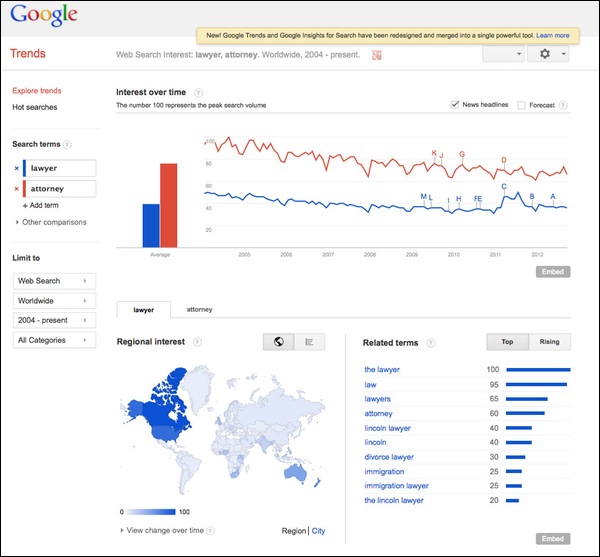
Google Trends

It looks like this free tool on Google might lend itself to some amazing lessons on compare and contrast, data analysis, search, and literacy.  I can't wait to try this with fifth graders this year!


Here's one I've set up:
https://www.google.com/trends/explore#q=%2Fm%2F01kmd4%2C%20%2Fm%2F01jz6d&geo=US&cmpt=q&tz=Etc%2FGMT%2B4


Monday, June 1, 2015

http://www.cultofpedagogy.com/starter-kit-differentiated-instruction/

Differentiation Ideas

Monday, February 9, 2015

Students Lacking Motivation in Math?

Here's one math teacher's take on pitfalls of math education and ways to fix it.